
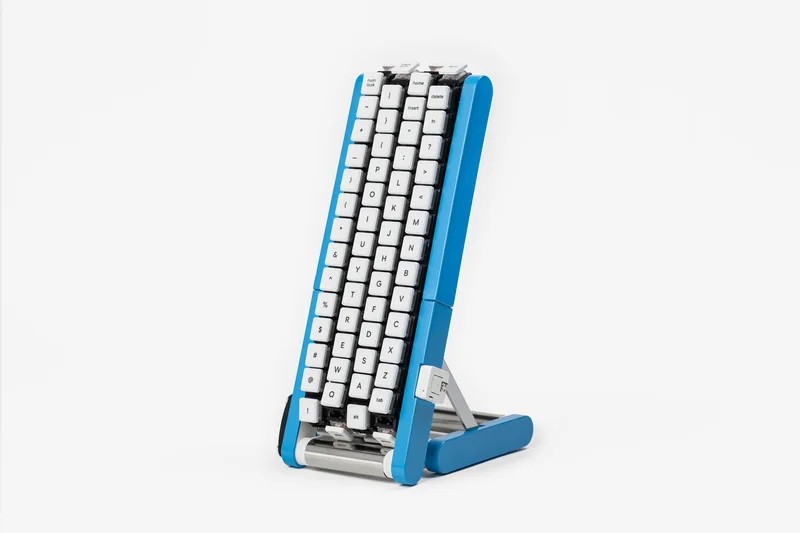
Photo: Gboard Conveyor Belt Version by Google Japan, from the google/mozc-devices repository, licensed under the Apache License 2.0. Converted from WebP to JPEG.
Every keyboard you have ever used makes the same assumption: the keys stay still and your hands do the moving. Google Japan's Gboard team looked at that arrangement, decided it was the problem, and built a keyboard where the keys ride a conveyor belt past your fingertips. You don't reach for the letter "A" anymore. You wait for it, like a plate of salmon nigiri at a sushi bar.
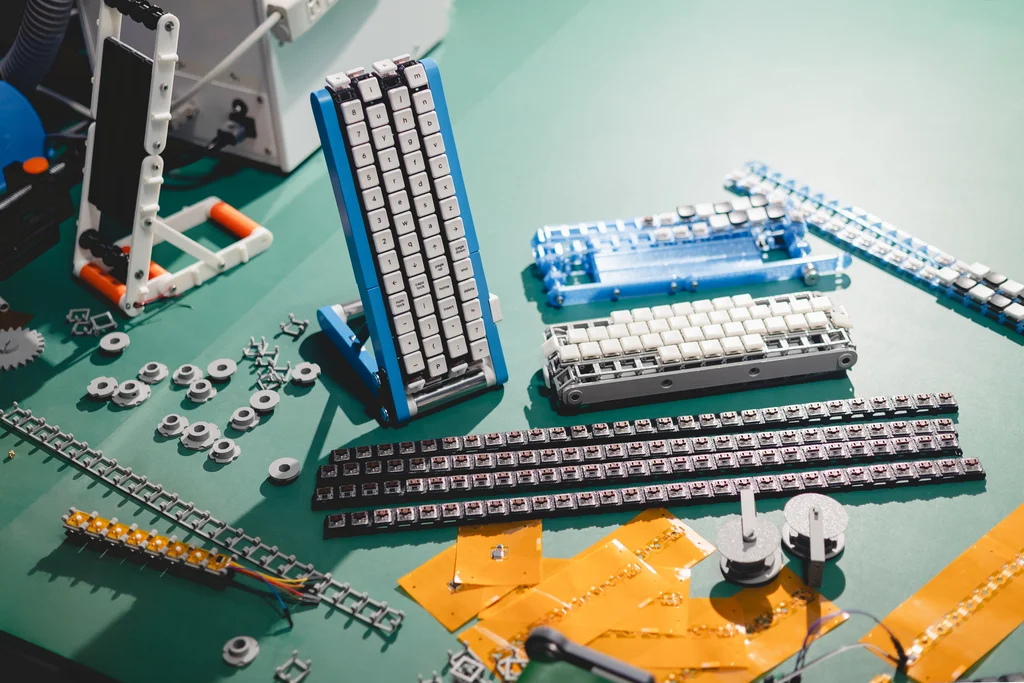
Photo: Gboard Conveyor Belt Version build parts by Google Japan, from the google/mozc-devices repository, licensed under the Apache License 2.0.
Introduction
On October 1, 2026, Google Japan unveiled the Gboard Conveyor Belt Version (in Japanese, Gboard くるくるバージョン — roughly, the "round-and-round version"). It is the 15th entry in a long-running series of deliberately absurd keyboard "proposals" from the team behind Gboard, Google's keyboard app for phones and tablets.
It's a joke, and nobody involved pretends otherwise. You can't buy it. But in keeping with recent tradition, the team published the design files on GitHub, so anyone with a 3D printer, a soldering iron, and a free weekend can build a working-ish copy. This week we're keeping things light and taking a closer look at the silliest keyboard of the year — and at what a company gains by putting real engineering into a gag.
What Is the Gboard Conveyor Belt Version?
The pitch on Google Japan's official blog is delivered with a completely straight face. Traditional keyboards, the team argues, assume you're typing with both hands. Try typing with one hand or a single finger and you end up swinging your arm all over the keyboard. Their solution: don't move your arm — move the keyboard. The team calls this a "Copernican turn" in text input, with the user now at the center and the keys orbiting around them.
In practice, that means:
- Four belts, 29 keys each — 116 keys in total, rolling continuously toward your hand.
- Timing-based typing. You watch the keys flow by and press the one you want when it arrives.
- Uppercase and lowercase keys on the belt, so you can type either directly without reaching for Shift.
- One-handed operation, which the blog says frees your other hand to sip tea or use a mouse. Build a second unit and, the team suggests, you might achieve two-handed productivity.
The roadmap is equally committed to the bit. The team says it is considering trend-matched color variations, a high-speed mode, a long version that supports more characters, and a short version suited for carrying around.
Why October 1?
The blog's mock FAQ answers this directly. Many keyboards use the classic 101-key layout, so 10/1 felt like the right day to announce a keyboard. The same FAQ contains some of the best wordplay in the release — including a description of the development process as "waterfall-based," rotating not just the PDCA cycle but every character. Our favorite line from the post is the team's diagnosis: after stopping to think about what was wrong with keyboards, they realized the problem was that keyboards stop.

Photo: "Kaiten sushi" by Benjamin Hollis, via Wikimedia Commons, licensed under CC BY 2.0.
The resemblance to kaiten-zushi — conveyor belt sushi — is hard to miss, and it's the easiest way to picture the experience: you sit still, and the options come to you. With sushi it works because you don't need a specific plate right now. Typing is less forgiving. As Hackaday pointed out, if you make a typo, you get to wait a full rotation for the Backspace key.
Sixteen Years of Very Serious Nonsense
The conveyor belt keyboard sits at the end of a long line of gloriously impractical input devices. According to Google's own project repository, the series began on April 1, 2010 with the Drum Set Version of Google Japanese Input — a cubicle-sized drum kit covered in keys, played with drumsticks.
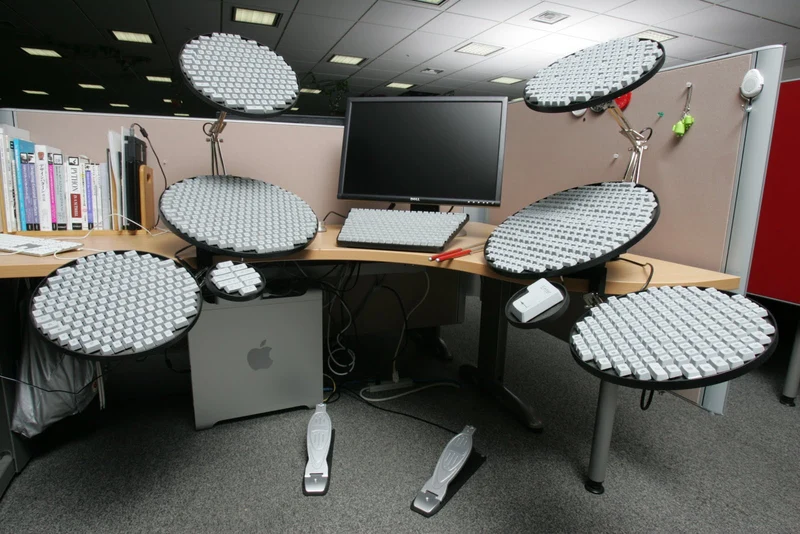
Photo: Google Japanese Input Drum Set Version by Google Japan, from the google/mozc-devices repository, licensed under the Apache License 2.0.
From there, the team kept going. A few highlights from the official list:
- 2012 — Morse version. A single-key keyboard for Morse code input. Engadget notes that Google later added real Morse code input to Gboard on Android in 2018, so not every joke stays a joke.
- 2013 — Patapata version. One button cycles a split-flap display through every character until you hit the one you want.
- 2017 — Puchi Puchi version. Text input by popping bubble wrap.
- 2019 — Spoon Bending version. Exactly what it sounds like.
- 2021 — Yunomi version. Keys wrapped around a traditional Japanese teacup.
- 2023 — CAPS version. A giant keycap you wear as a hat and rotate on your head to choose characters.
Through 2019, these were April Fools' releases. After skipping 2020, the team moved the tradition to October 1 in 2021 and has kept it there since.
The last two entries are the closest relatives of this year's design. The 2024 Double-Sided Version arranged keys on a Möbius strip, so there's no real front or back. The 2025 Dial Version brought back the rotary phone, letting you dial in each character.
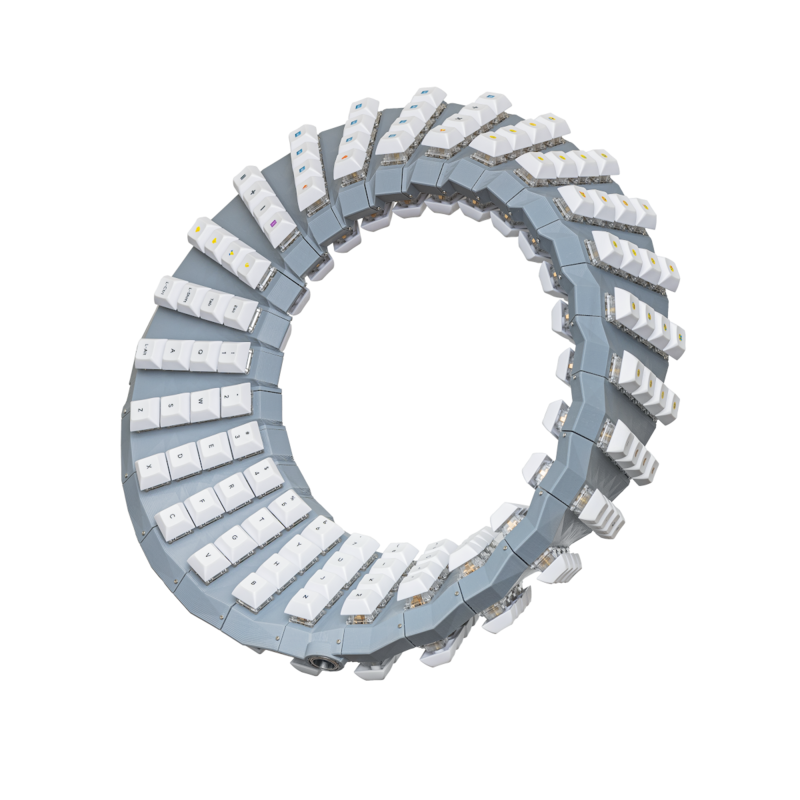
Photo: Gboard Double-Sided Version by Google Japan, from the google/mozc-devices repository, licensed under the Apache License 2.0.
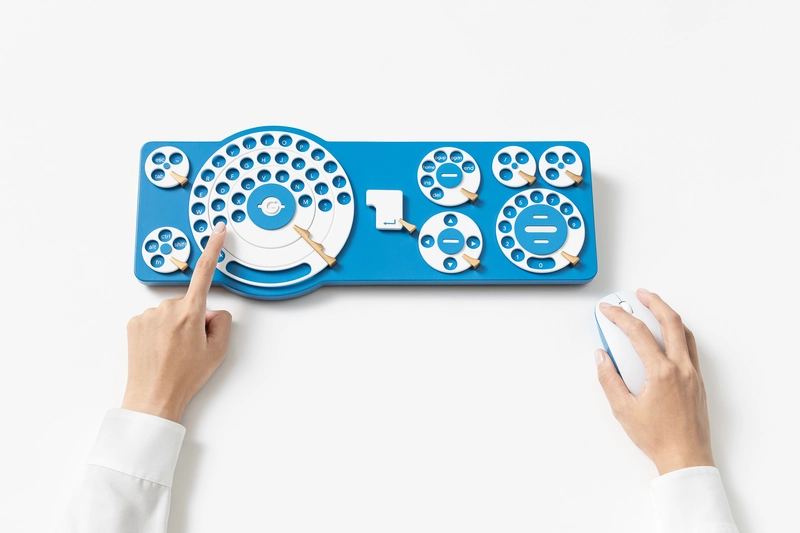
Photo: Gboard Dial Version by Google Japan, from the google/mozc-devices repository, licensed under the Apache License 2.0.
Yes, You Can Actually Build One
What makes these projects more than a press-release punchline is that the team ships real hardware files. The mozc-conveyorbelt folder includes:
- KiCad schematics and PCB layouts for the electronics
- Firmware source code and project files
- 3D-printable STL files for the case, belts, and mechanism
- A build guide for putting it all together
KBD.news, which tracks keyboard projects, lists low-profile Choc V1 switches, a flexible PCB along each belt, an M5Stack ATOMS3 Lite controller built on the ESP32-S3, and a motor with a motor driver — parts you rarely see in a keyboard bill of materials.
A word of caution before you order filament: the build isn't fully documented yet. Hackaday found that parts of the guide are still marked as to-be-determined, including how keypress signals actually get off a moving belt and into your computer. The repository also states plainly that this is not an official Google product. Treat it as a fun maker project, not a supported device.
Why Build Something This Silly?
It's easy to see projects like this as pure novelty, but there's a real lesson for anyone building a product or a brand.
- Craft makes the joke land. A mock-up wouldn't have traveled nearly as far. A working mechanism, a straight-faced product page, and published blueprints are what turned this into a story Engadget, Tom's Hardware, Android Authority, and Hackaday all covered.
- Consistency builds anticipation. After more than fifteen years, people now look forward to every October 1. That kind of recurring attention is hard to buy.
- Open sourcing invites participation. By releasing the files, Google turns readers into builders. Hackaday's coverage ended with readers brainstorming how to actually solve the wiring problem.
- Play can point at real problems. Under the gags, many of these concepts poke at genuine input challenges, such as one-handed typing or Japanese input with far more characters than a standard keyboard has keys. Morse input made the jump from joke to real feature.
For startups and dev teams — including the many here in the Philippines who run hackathons and maker meetups — that's a useful reminder. A small, well-executed side project with a sense of humor can say more about your team's skills than another corporate announcement.
Conclusion
The Gboard Conveyor Belt Version will not replace your keyboard, and that was never the point. It's a well-built joke with blueprints you can actually download, and it continues one of the most charming traditions in tech. Somewhere, someone is already 3D printing their first belt. We'll be watching for the high-speed mode.
Note: This article reflects information available as of October 10, 2026. Product details are taken from Google Japan's announcement and the official GitHub repository; build documentation may change as the Gboard team updates the project.
References
- Gboard チームからの新しいキーボードのご提案 2026 — Google Japan Blog
- google/mozc-devices — GitHub
- mozc-conveyorbelt — GitHub
- Gboard くるくるバージョン — promotional video (YouTube)
- Google Japan created one of the strangest keyboards ever, and we're dying to try it — Engadget
- Conveyor Belt GBoard Brings The Keys To You — Hackaday
- Gboard Conveyor Belt Version — KBD.news
- Google Japan shows off wild conveyor-belt keyboard — Tom's Hardware
- Google's bizarre new Gboard puts your keys on a conveyor belt — Android Authority




.jpg)